
All entries, digital and print, need to be entered into the website. If at all possible, please submit your own entries via the website otherwise someone (generally the judging chair) will need to do it for you. If you don't have access to the internet, you can submit via CD.
To enter:
Step 1: Make sure you are logged into the website and that you are marked as a paid member.
Step 2: Find the competition you wish to enter on the competition schedule.
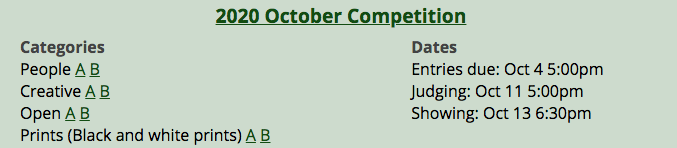
Step 3: Click your group next to the category you wish to enter and you will be taken to the competition section page.
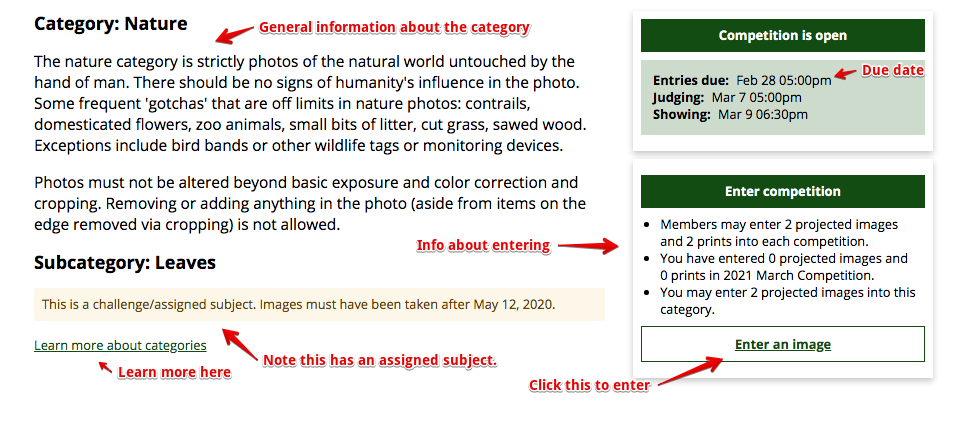
Step 4: Read the category description, subcategory description (if any), as well as any additional notes so you are aware of any special restrictions or concerns before submitting.
On the right, there is a box that will show you any entries you already have in that section as well as how many, if any, you may enter. If you are able to enter that section, there will be a link to enter. Click that and the form will pop up.
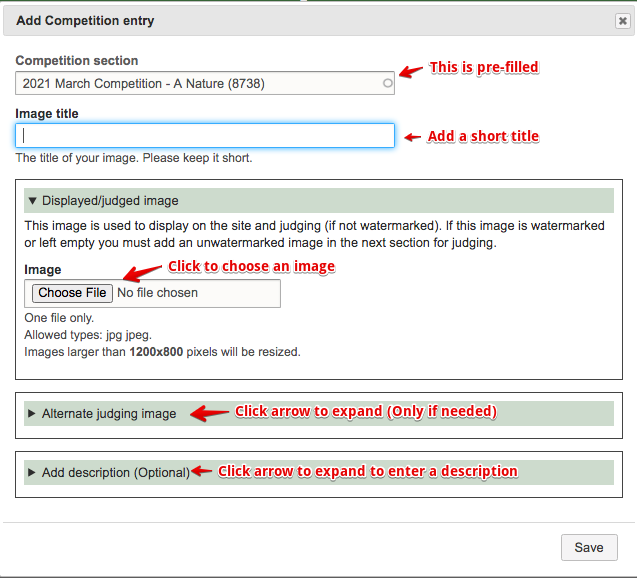
Step 5: Fill out the entry form.
Image title: This is the name of your image. Please keep it short or it may be truncated when displayed in lists or the newsletter.
Displayed/judged image: Click "Choose file" and then pick the image you prepared from your computer.
- If you are submitting both a watermarked and clean judging image, this should be the watermarked one.
- If you are only submitting one clean image and not a watermarked one, add it here.
- If you are submitting a reference image for a print entry and are ok with it being displayed on the site, add it here. This may be watermarked.
- If you do not wish to have your image displayed on the site at all, skip this field.
Alternate judging image:
- If you submitted a watermarked image in the previous step, this is where you submit the clean image.
- If you left the first image empty because you don't want your image displayed, you must put the image to be judged (or used for print reference) here.
- If you entered an image in the first field that is acceptable for judging or is a print reference, you may leave this field blank.
Permissions:
- Allow decorative use. Check this if you are ok with this image being used to decorate other parts of the website such as event images or on news posts.
- Allow social media use. Check this if you are ok with the image being shared (with credit) outside the website to advertise the club.
N4C:
- Location. If this image is suitable to enter in the Travel contest for N4C, put the state (if US) or country name here. Leave blank if it's not a travel photo.
- Black and white? If this image is suitable to enter in the Black and White contest for N4C, check this box. You can check this on the digital version of print entries but it will be the digital image, not the print, that is submitted to N4C.
- Journalism. If this image is suitable to enter in the Journalism contest for N4C, check this box. These are photos similar to what you'd see in a newspaper and should have only minimal editing that does not change the content of the image.
Description: Optionally add information about how you created the image, where you took it, etc. This is not used for judging. It is displayed along with the image in the gallery for the education of the viewers.
Save the form and you will be returned to the Competition Section page. You should see your newly submitted image in the box and the number of entries you can submit will be reduced by 1.